Understanding Network Devices
what is network
from very basic computer + wire + protocol
A network is a group of connected devices that share data and resources.
(in tech people cant leave a chance to make name fancy , we could say rule instead of protocol )
Networking Device and its type
A networking device is a hardware that helps devices to talk to each other as a intermediator
there are various type of networkign devices
Modem
Router
Switch
Hub
let us discuss one by one;
1.Modem
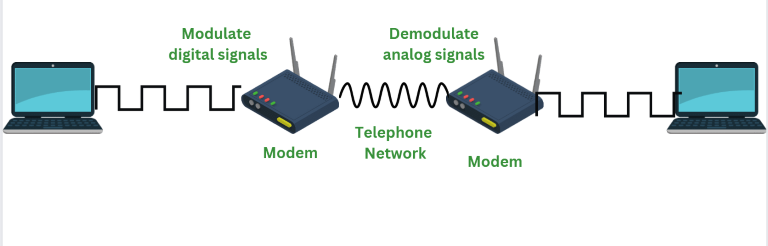
modem is made of MOdelutaor +DEModulator
Modulator - convert digital signal into analog signal for transmission
Demodulator - convert inoming analog signal into digital data
modem is reponsible to bring the data at our desired place by converting ISP(internet service provider) into usable data . without the use of modem wifi and router are useless
so modems only job is convert ISP signal into intrnet data that your network can use
types of modem
different isp use different line so modem comes in typte which translate these signal into digtal data ;
common types;
DSL Modem → Use phome lines , slower , wodely availibale
Cable Modem → use tv cable , faster than dsl
fibre Modem/ ONT -> use fibre optics , super fast
network flow : Internet → Modem → Router → Devices
basic analogy
modem → translator
ISP speaks fibre / cable signal but our device use ethernet so modem is used.
2.Router
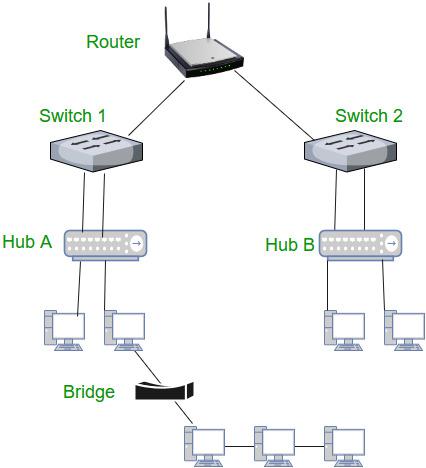
it is a device which took data from MOdem and distribute them to different devices. a Router act as traffic police man which divert the traffic on different road , without router we can use internet but it would be happen only for 1 device. Nowdays router and modem are coming combingly
in development backened server also rely on router to traffic proprly , if not maintined prperly, it blocked request happening at backened
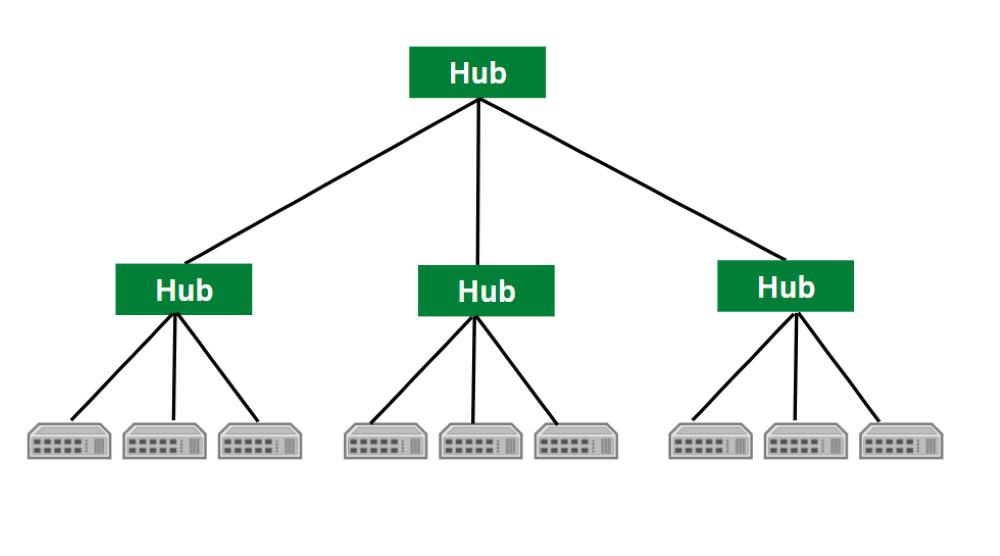
3.Switch and Hub
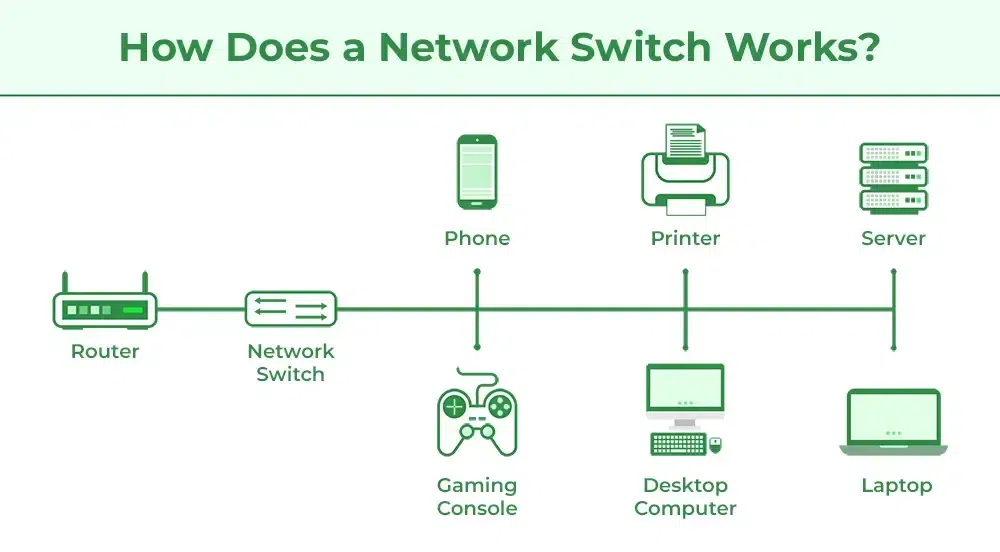
/
just like a email send to everyone ecen ppl dont need it
Switch → it send data to a tageted devics not blindly, making the netwirk more fast and efficient
just like your email goes to only receipient , saving time and bandwidth
basic analogy
hub → loudspeaker announcment for particular person even other an hear it
Switch → just a notice reach to a desired person
in development
Local traffic efficiency matters
When you run a local development server (like testing a website or API in your office or lab), a switch ensures only the device that requested data gets it.
Hub would send data to all devices, wasting bandwidth and slowing things down.
Switch = faster, safer, closer to how production networks work.
Hub = outdated, inefficient, mostly irrelevant in modern dev setups.
Firewall
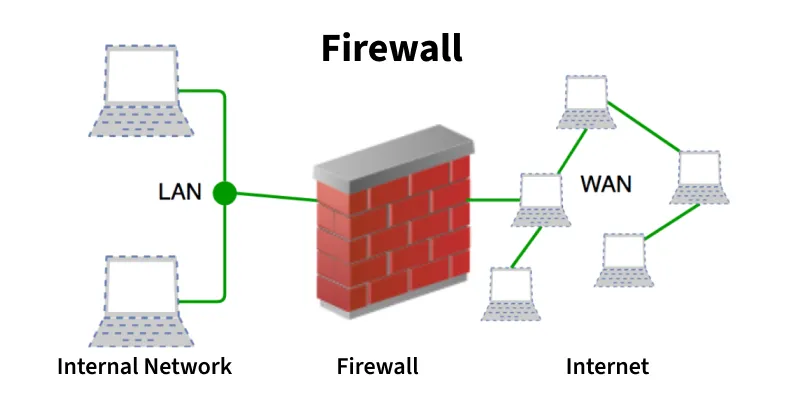
it act as a barrier , monitor incoming and outgoing traffic only allow safe data and prevent blocking threats
its network flow Internet → Modem → Router → Firewall → Devices
it does not necessary to put it after router yu can put it before that but it protect all device behind it. also remember not alone antivirus keep u safe but also theses a firewall which protect the network
in devlopment : in prodution , firewalll ontrol which server to talk to which one
Load Balancer
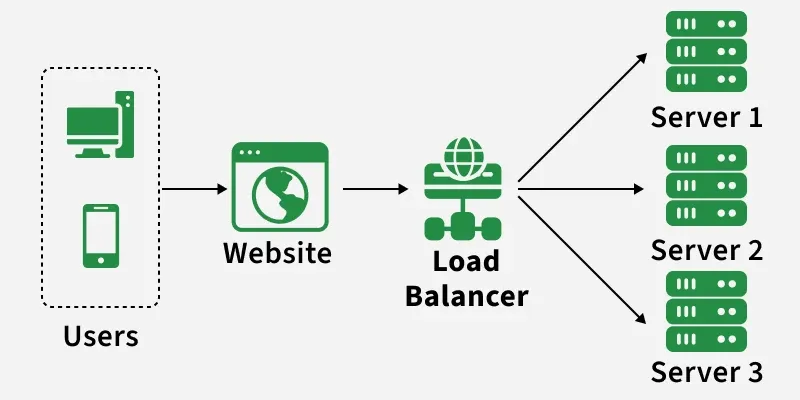
it is basically a traffic amnager for multiple servers
it split user request across multiple server so that no particlar server get overload and keep the system fast
for eg a e commerce website use a load balancer s o that the user can shop without lag or crashing the websitr
Network flow: Internet → Modem → Router → Firewall → Load Balancer → Servers
in dev : helps in scale app , insure smooth user exxperience ( no lag ) also crucial when deploying APIs or web apps to production with man users
Real world flow
basically here we will connect all the devices to deliver internet safely ans efficiently
ISP / Internet: Warehouse where all good ( net ) come from
Modem: Toll booth at city entrance translating incoming truck ( isp ) into city ready vehicle ( digital data )
Router: it is like a traffic police guiding traffic
Switch: Office receptionist delivering messages to the right person
Firewall: like a security guard letting only authorized people in
Load Balancer: Multiple delivery trucks to avoid conflict
via these process packages ( data ) rwch to its correct place ( device ) safely
Network Flow Internet → Modem → Router → Switch → Firewall → Load Balancer → Devices / Servers
Each device has its own specific job
Together, they make the network reliable, fast, and secure
in devlopment →
they all helps us understan how request trsvel from user to backened
it also explain why latency or downtime happen at certain point
it also guide us production deployment and troubleshooting


