Git Starter Guide
one things u all should always ask qus why , why u need this why u need that ; why u need to learn git ? why react js ? why node js ?
1.Problem
what would u do if codebase grow larger ? what would u do if u collaborate with multiple people and one of them make mistake who will you make responsible , isnt this scary ? how will u keep record of person contribution ? dont worry a hero will come its git
What is git?
in one liner we caan say it is a tool that saved the hostory of your code Git is a distributed version control system ( just a fancy name) which means every person of team can get a full code of the project and its history ( who had done ahat and where ) on their own computer. everyone have their git on theire own computer so we need to centralise them so that everyone use same tracker as a git so them make github .
theres a intersing story behind git in early days when a linus is developing thier code base is growing larger and larger so they make git as a side project to track the code base ; intersting isnt it .
- Github - it is a centralised system which can be consider a centrslise for multiple ppl so that they can have same git
2.Core concept
Repo - It is a basically your project with history
Commit - It saved our work
Branch - it is copy of project to work safely
Stage - Select what goes into the next commit
Push - Upload your code to github
Pull - Download latest code from github
3.Commands
git initit start git tracking .
git statusit shows the current state of your project
→ it also say which file changed
→ it also tell which file are staged
git addit move file to staging area ready for commit
note- it exist because git let you choosee what to commmit , not everything need to be saved
git commitit create a permanent checchpoint of staged files.
git logit made you visible all commit made so far
→ you can see
Who made changes
When changes were made
Real Workflow Example
| git init | start git |
| git status | check changes |
| git add | stage files |
| git commit -m “messaage” | save snapshot |
| git push | upload to github |
flow Code → Stage → Commit → Push → Github
Git Workflow: How Changes Move From Local to GitHub
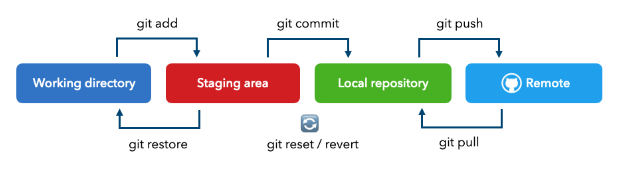
Working Directory — Where you write and edit code
Staging Area — Where you select files to save (
git add)Local Repository — Where commits are stored on your computer (
git commit)Remote Repository — Where code is uploaded online like GitHub (
git push)
Git Collaboration Flow (How Multiple Developers Work Together)
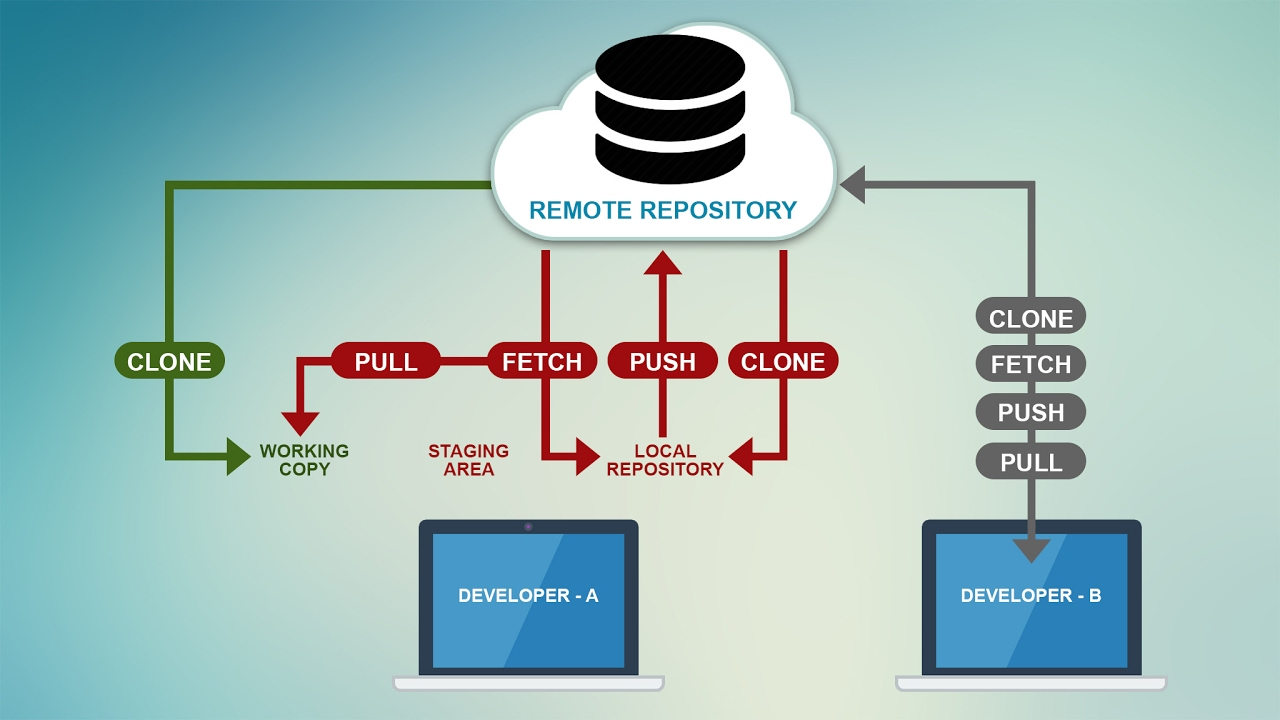
This diagram shows how two developers share code using GitHub.
Explanation:
Clone → Download project from GitHub to your system
Working Copy → This is where you write and change your code
Add + Commit → Save your changes inside Git on your computer
Push → Send your updated code to GitHub
Fetch → Check what new changes are available on GitHub
Pull → Download and apply latest code to your project
How It Works in Real Life:
How Git Works in Real Life
Two developers download the same project from GitHub.
Now both have a full copy on their own computers. They work on features separately . When something is finished, they save their changes using commits.After that, they upload their updates to GitHub.Other team members simply download those updates and get the latest code.
thats it from my side
thank you for reading
Dushyant Pratap Singh
18 jan 2026


