DNS Resolution
lets say you know a person name but u need their phone number , dns is that conctat book that finds it for you :
here person is google.com , phone number is ip adress
DNS resolution is a process where a domain name is translated into IP adress by quering DNS server in hierarchical manner .
DNS : The Internet’s Phonebook
DNS stand for Domain name system . it is like a internets phonebook .
human search using name like google.om , youtube.com but the computer does not understan what that shit means , computer preffered numbers to be precise ip address .
DNS act as bridge between website and user, without dns you are supposed to learn the ip adress for each and every website you want to use , which is unrealistic
What is DNS
convert Dmain name → IP address
when you type
youtube.com
DNS return
142.250.xx.xx
dns do no load wesite it only find where he website is live
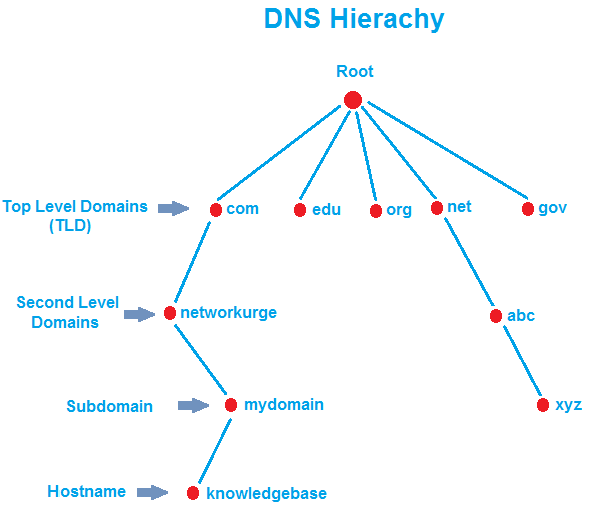
DNS Hierarchy
think it as asking for direction you start from root ( main guide ) , it points you to TLD ( like a city ) , tld direct you to exact domain ( street ) and finally the domain takes you to specific host ( house )
DNS Query Command
they manually allow yout to perform parts of DNS resolution
DNS query command allow you to
converts domain → IP Address
chexk dns record debug DNS problwms
See which name server respond
Some basic DNS query command
dig
it is more detailed query tool
it shows:
IP Address
Record type(A, MX, NS, CNAME)
TTL (cache time)
which DNS server replied
full DNS response secction
eg dig google.com
we use this as this show raw data , no hiding full transparency but it is long and can be heavy for beginner
nslookup
it is a baisc DNS liikup utility
it shows
Domain → IP mapping
Name server info
eg nslookup google.com
it is uses for quick checks not deep analysis
host
it is lightweight DNS lookup command
it shows
Very readable output
No extra noise
Fast checks
eg host google.com
it gaves less details than dig
dig command
It is a simple command that find out a what ip adtress does a domain name get from DNS . it helps us in understanding how dns actually wotk
used
it is used whn you want to check DNS behaviour
for example
wen a website is not openig :
does dns returning the correct ip or is the domain resolving
when u want to find out the domains Ip address
when learning how dns actually work
step by step DNS Resolution Using dig
1.Root Name Servers : dig . NS
The . means the root of DNS system
NS asks for Name Server
so when you run dig . NS
you are asking who are the root DNS server ? WHere does the DNS system start
we got something like this
a.root-servers.net
b.root-servers.net
c.root-servers.net
...
Root name server → they are the special dns server present at the top of hierarchy
there are 13 root server name from A to M
Each gropu has multiple ohysical server worldwide
why root server matter
They are the starting point for all DNS resolution.
Without root servers, no domain on the internet could be found.
2.dig com NS -TLD Name Server
command dig com NS
this ask the DNS that who manages .com domain
their output look like
a.gtld-servers.net
b.gtld-servers.net
...
3.dig google.com NS
command dig google.com NS
it basically ask which server are responsible for google.com
Authoritative Name Servers → they are the main server of website/domain:
For Google, we willl see something like:
ns1.google.com
ns2.google.com
These are Google’s own DNS servers.
4.dig google.com
command dig google.com
this basically ask dns that what is the ip adress of google.com
output look like
google.com → 142.250.xx.xx
Full DNS Resolution Flow (Easy)
When you type google.com in browser, this happens:
Step 1
Ask Root Server
→ Where is .com?
Step 2
Ask .com Server
→ “Where is google.com
Step 3
Ask Google’s Name Server
→ “What is Googles IP?
Step 4
Get IP Address
→ Browser connects to website
In dig form:
dig . NS
↓
dig com NS
↓
dig google.com NS
↓
dig google.com
what is recursive resolver
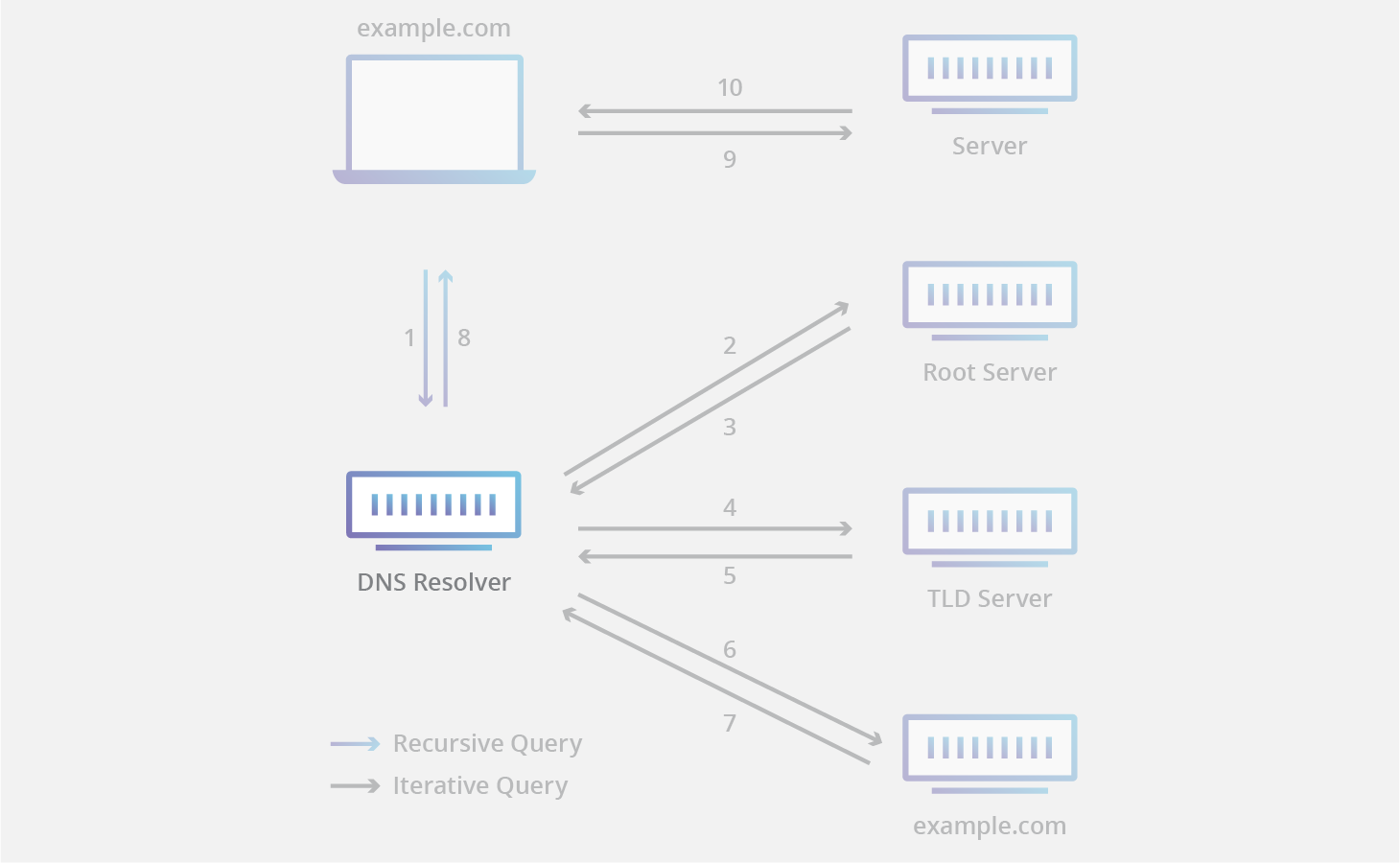
it is a DNS server that
takes ur request
find the answer step by step
return the final ip to you
why this exist
imagine if ur browser had to talk to 3-4 server every time, this m=is slow and inefficient


